Intro to Java Annotations

This entry is part 9 of 13 in the series Intro to Java

Annotations allow you to attach metadata to a field, class, or method. Metadata is data that describes something else. For example, metadata about a song in mp3 format could be the artists name or the bit rate it was encoded at. A jpeg image could have metadata that described the image height or the number of colors in the image.

What do they look like?

@Override
public String getName() {
	return "no name";
}

The word after the ‘@’ is the Annotation. It precedes a method or class name. The Override annotation is built into Java. It is used to indicate that a method overrides a parents method. These are used for compiler hinds, for documentation, and to apply meta data.
Continue reading

Setting up Linux Software Raid

This entry is part 3 of 3 in the series Building a NAS

Dual Drives for Raid 1This is part of our series on building a NAS. In this article we will get the box set up with a static IP address, and get your drives set up for RAID 1.

We are assuming that at this point you have Ubuntu installed. We are gong to install software raid in a moment. The first thing I want to do is make sure we have a static ip address. Usually Ubuntu will start up with a dynamic ip address. This can make it more difficult to transfer files to this box, so lets make it static.
Continue reading

Intro to Java Generics

This entry is part 8 of 13 in the series Intro to Java

To me it seems a better word would be Specifics. The use of Generics is applying a specific type to a class that can be used in a generic way. One of the most common generic classes is List. A list allows you to put any type of Object in to it. In fact, you can put several different types of Objects into a List. But, there is a way to create a specific List type that can only take one type of Object.

What do they look like?

Since we are talking about Lists, lets look at what a ArrayList would look like that could only take Strings.

List aList = new ArrayList();

What goes between the <> is the type that you want to specify for the List. You need to do it in the left side declaration, and on the right side where you are creating the Object.
Continue reading

Where to Photograph in Seattle

I am going to Seattle in few weeks, and I have been trying to figure out what to shoot while I am there. I wanted to go check out Pikes Place Market, but wasn’t sure what else to do. On that same site, I saw Snoqualmie Falls. Hard to know how much I want to rent a car. Could get expensive.

I found a couple of sites that could help in the research. The Photographers Guide to Seattleblog looks interresting.

There is a flickr map of Seattle to check out.

I also found this Google map of one guys Seattle photos. Some of these night shots would be really neat to take. Once again, not sure how easy to get to these by bus. A scooter maybe?

Intro to Java Collections

This entry is part 7 of 13 in the series Intro to Java

I don’t want to get too deep into every little thing in the collections classes here. In fact, you already know a fair bit about them, because we have used them with some of our Animal class examples. This is more an overview of some of the basic Collections classes.

What do they look like?

There are three main types of collections: Lists, Maps, and Sets. Technically you could try to argue that Map doesn’t extend Collection, so therefore it is not a Collection, but I think of it as part of the group.
They are used for groups of objects, or exactly as its name would imply, collections of objects.

List

A List is just that, a list of objects. The List interface provides a way to add, remove and get objects from a list. It however is just an interface. ArrayList is one of the more popular concrete collections that implements the List interface. Each implementation of the List interface may behave slightly different, but once you understand how a List works, you have a good start on understanding any List.
Continue reading

Thursday Link Roundup

Here are a few links from around the web that have caught my eye.

First off, if you are from Minneapolis, the World Photo Walk Day site for Minneapolis is up and working now. Get your spot before it’s full.

onOne software has a free version of their Photo Tools 2 software that gives you 14 of their tools.

Nikon World has a write up on Scott Kelby and a few of his images. I found out that Scott was a fashion photog, and gave it up before coming back and writing all the photography books.

Moose Peterson has a video mini review of the Nikon 24-70 AFS FX lens. Right at the end he says that DX shooters should NOT get this lens.

David duChemin has a video podcast up based on the ideas in Within the Frame.

From David Zizer: If you were just starting out, how would you build your client base.

Recently met Joe Federer, a pretty cool guy and local Wedding Photographer. Check out his blog. A couple posts down is an example book he creates. Wow!

Joe McNally has a blog post called Getting High. This isn’t about getting on a ladder to shoot. Try the Empire State building. Many of these images are also from “The Moment it Clicks”.

Came across flickr user hellziggy. She has some nice pictures of birds up on her photostream. Also, of interest to people from Minneapolis, she has tagged her pictures with their location. I might have to sneak over to some of her spots.

Aperture 2 Dodge and Burn

I am not sure why I was acting to ridiculously. When version 2 came out, I was super psyched, then I found out that if you wanted to use the Dodge and Burn tool, Aperture would make a copy, and send you to the plugin. If you had made any adjustments before this, you couldn’t tell anymore, all the sliders would look reset. It bugged me that the dodge and burn plug in wasn’t non destructive. So… I ignored it.

Just recently I came across an image (can’t find it now) that was adjusted with this plug-in, and I had a “what the heck” kind of moment. I immediately fired up Aperture to re-check out this tool. To get to the plug-in, right click on an image, select Edit With… and pick Dodge and Burn.

Selecting Dodge and Burn

Continue reading

Lake Harriet Pictures

Went to Lake Harriet Sunday night with Kristen. As I got there and was looking for her, I spotted some great light on some tulips, so I had to stop to take this:

Painted Tulips

The background looks painted, but it isn’t a photoshop effect, just a result of taking the picture at f/1.8. I did some burning on the background, but that is about it.

We were there to hopefully get a sunset picture, but not much luck. No clouds. I did get a couple of things though.

Dock at Sunset 

Dock Fishing 

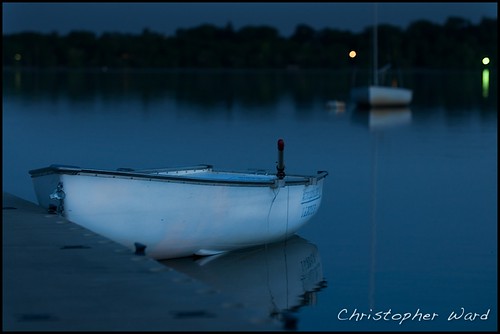
Kristen then had to leave, but I when down to the Band Shell, and took some shots of the tenders and boats there. It was really calm, so you could get longer exposures without bluring. This is a couple of my favorites.

Tender at Night 1 

Boat Glow

Interview with David duChemin

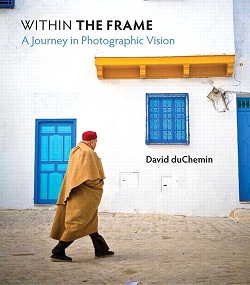
Within The Frame by David duCheminDavid duChemin is a photographer, blogger and author of the book Within the Frame.

Note: This is not really an interview with David. He was not involved with this at all. This is just me misappropriating his words from his book. My leading questions, his words taken completely out of context…

Chris: Hey David, lets get right to the questions. Would you say this book is just for professional, travel, or aspiring travel photographers?

David: It’s a book for everyone who’s wanted to shoot images of the places and people they love, whether or not they ever go around the world to do it.

Chris: So your goal with this book is to reach all types of photographers, not just travel photographers?

David: If you come away with anything from this book, I hope it is a renewed resolution to seek and serve your vision through this elegant craft.

Continue reading

Tamron Customer Service

tamron17-50I sent my Tamron 17-50 f/2.8 in to be serviced a couple of weeks ago. I was wondering if they really got the lens, as I hadn’t heard anything from them. I knew they really got it, because I asked for signature confirmation from USPS. Still, I hadn’t heard from them. I decided to go online and look around. I found a service section, but to get a status on your lens you had to have a service order number. I didn’t have one yet. They had a repair status form, so I filled that out. And waited.

I gave up waiting and called. Virtually no hold time and I was though. I give them points for that. I talked to someone who was able to confirm that they indeed had the lens and that it was sent to the repair area. That meant that they agreed that it had issues. Then I was told it would be 2 – 3 more weeks to do the repair. Really? Wow. That is not the fastest shop around. So then I asked if normally they sent out emails on the status of the repair, such as if they recieved the lens, if it had been sent to the repair shop, that kind of thing. The response was “No, we don’t have time.” Really? Wow.

To me, this means that either there are a lot of Tamron lenses that go back so they are overwhelmed, or they just don’t hire enough staff. I have never sent an item back to Nikon. I wonder what the turnaround is for Nikon and Canon, and how well they keep you up on the status of repairs. I was not expecting a personalized thoughtful carefully crafted response. I was expecting and automated email to go out when somone entered into the computer that the lens had arrived. I was expecting an automated email to go out once somone had looked at the lens and entered into the computer what problems they found. There shouldn’t be a time issue with this.

Tamron, you need some technology applied to your customer service area. By the way, I am looking for a programming job, do you want me to implement that for you?

Update: Lens fixed.