Snow Leopard Upgrade Time?

I was supposed to receive my copy of Snow Leopard to upgrade my Macs today. I was away when delivery was attempted, and it requires a signature. Probably a good thing. I think I need to hold off on the upgrade on my laptop at least.

This software compatibility list shows that I may have a few problems. Lots of things are working, and CS3 issues about whether it works or not appear to be resolved. But there are a couple of key items that have issues still. VM Ware Fusion, and TrueCrypt still have issues. They will need to be fixed for sure before I upgrade.

Lightroom is supposed to work, and I just got an Aperture update to make it compatible, so that covers the photography stuff I use. I wonder if there are plugin issues?

Make sure you do a survey of all your software before you pull the plug on the upgrade.

Update: Looks like MacFuse, which TrueCrypt uses to overlay the encrypted volumes is the real culprit. Version 2.0.3 is what I have installed. There is another beta build called 2.1.5, but not sure what it brings. There is a change log , but it wasn’t updated since v2.0 in 2008. Hmmm…

The Compromise Lens

Nikon 18-200 3.5-5.6 VRThat’s a bit of a misnomer. Every lens is a compromise. Even the best lenses have some compromise, such as being heavy or really expensive. What I just recently bought is what many people believe to be too many compromises. I bought a reconditioned Nikon 18-200 3.5-5.6 VR. The old one. (The new one isn’t out yet, but was recently announced by Nikon. Maybe not great timing.)

Here is a review at DP Review on the lens. If you jump to the last page of conclusions you will see that the review thought that it had distortion through out, and was soft at the long end. Despite this, Scott Kelby has used this lens on vacation many times and got great pictures. So, when it looked like I was going to be going on a trip where even a DSLR would be kinda heavy, I figured I needed to get to just one lens. (I couldn’t see myself going with just a point and shoot.)

The range you get with this lens is amazing. I went for a short ride on my bike with a fanny pack to check out the lens. It is crazy you can go from wide to really zoomed in just a twist of the lens.

As it turns out, the trip isn’t going to happen this year. Maybe another time. But I still have the lens. I think I am going to keep it. I have always wanted a better “walk around” lens. I find my 17-50 too short. I am often at the wide end of it, but sometimes you just need the reach. It would be great to have on photowalks so I didn’t feel I needed to carry more than on lens. It would have been useful on the beach when I was taking pictures of the girls too. The 17-55 was useful there, but sometimes…

It looks like this will be a very useful lens for anything that I am not doing client portrait work. It will take some getting used to the smaller aperture. We will have to see after some more use how I like that for people shots. I am often working at the 2.8 end of my lenses, so this is quite a change. I need to take and look at more pictures before I can know for sure. For now though, I will be walking around with just one lens.

Photoshop Lightroom 2 for Digital Photographers

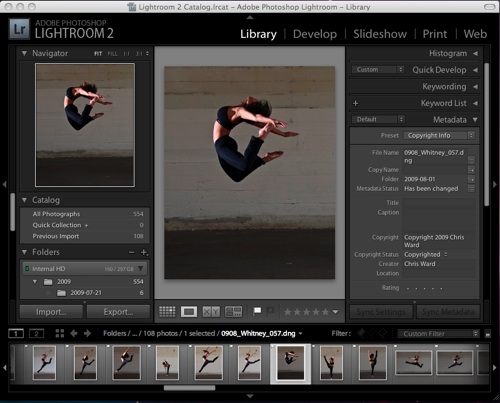
lightroom2The Adobe Photoshop Lightroom 2 Book for Digital Photographers by Scott Kelby is too long a title for a book. But I will forgive Kelby for the title seeing as the book is such a great resource for Lightroom.

I had decided to give Lightroom 2 a trial 30 day workout. I figured that if I wanted to really get into the software, I should get a book so I didn’t get bogged down. I have a couple of other books by Scott, and figured that this one would be good too. I wasn’t disappointed. I like his writing style, and his “just explaining to my pal” way of telling you how to do things.

From my last post, you can tell that I really liked Lightroom 2. I wonder how much of that was from the book. I started by reading the book before I even imported some images. When I went to import, I knew exactly how I was going to set up my import, how I would apply some basic meta data on import, and most importantly, that I should go get a sandwich while the import process happened.

There is a lot of good info and tips in this book. Many books on how to use software are of the sort where they go through menu options, and buttons and tell you what they do. Not really that useful. But thankfully, this book is not like that. It is truly useful. For example, in the beginning chapters on importing, he covers the pro’s and cons of where you might store your photos, and how you might organize your folder structure. How to convert your RAW files to DNG seemed simple enough, and I decided to do that on import. I doubt I would have without the book. Now I get my metadata like keywords saved back into the DNG file without needing a sidecar file. I doubt I would have figured this out without the book. Explanations on creating metadata templates for copy write info, file name templates, practical info on what the initial preview setting actually does and how much time it adds to import if you pick 1:1 round out some of the other useful things I picked up.

Coming from Aperture, there are many things similar, but sometimes you make assumptions that can be frustrating if you don’t get some help. It was great to find out some of the things that Scott himself uses to make his workflow easier. I liked all the short cuts he gave, and how to switch between viewing modes, and especially how to use the lights out mode to see just your image. I still don’t use short cuts with Aperture. The way Lightroom stores images and how best to use collections and the way he sorts his images was all great info. I may not use or set up Lightroom exactly the same way, but hearing how someone else is using it is a great start instead of just clicking around hoping what you are doing is a good idea.

I think that if I was to go on about this book, it would end up being the same thing about every section. Scott tells you exactly how he uses Lightroom, some other possibilities, and shortcuts on how to do it. Everything is explained in a very simple manner as if he was standing over your shoulder telling you what to do. The images perfectly complement the text. There are just the right number of images that help you figure out what is going on. This just happens chapter after chapter. For example, I jumped ahead and tried to use the printing module in Lightroom without reading that part of the book. I figured some of the stuff out, but was getting confused about margins. After reading that chapter, it all makes sense. And he doesn’t just have a paragraph on how to set margins, he shows you how to create a couple of different print layouts, which shows you how to use almost all aspects of the tool with real examples. This is why this is a great  book.

If you plan on getting Lightroom, or even if you want to really get a good sense of the software during the 30 day trial, I definitely recommend this book. Get it before you download the trial or buy Lightroom and read the first few chapters. It will make your time with this tool much more useful and productive.
Sisters in Matching Dresses

Sisters

I think I forgot about posting these pictures. When I got home these pictures were waiting printed in 5×7 size to go in a frame that holds the three of them. The frame doesn’t look quite like the picture, but I did it up anyway.

These girls in matching dresses that their mother made are my little girls Kate and Lily. It is hard to get them to sit or stand for a portrait. I had used a small light box, and you can see it miss Lily and just hit the side of her face because she kept moving. Note to self: with kids use very large softbox or umbrella.

First Lake Winnipeg Beach Pictures

I had the girls up at my parents cottage in Lester Beach, just north of Winnipeg in Manitoba. When I was growing up, we used to spend the entire summer up at the cottage. This year I was lucky enough to be able to spend two weeks with my parents, sisters and my girls there.

Cottage at Lester Beach

That’s Lily in front of the cabin. Notice the lack of grass. Nice to be somewhere that doesn’t need mowing. Here are a couple of other pictures of the girls from the beach. There were hundreds more taken, I just wanted to get a couple up.

0908_LakeWpg_054

0908_Beach_073

How Internet Addicted are you?

I am back in Winnipeg (will be in Minneapolis in another day) after spending almost all of the last two weeks at a cabin on Lester Beach (near Grand Beach) on Lake Winnipeg in Manitoba. We had no land lines, cable or phone, so no Internet. Sort of. I added a Canada phone plan so I could make cheap calls at 59 cents a minute? ?!#$%?? I also added a data plan to my iPhone, but was paranoid about using it, going over, and paying $5.99 a meg. So I really just checked email headers, and responded to a couple of them. I tried out TweetDeck a couple of times, and it even said I was lame and it wanted a high speed connection. Turns out after looking at my usage numbers that the iPhone doesn’t use quite as much as I thought. At least using those apps. I am sure that regular browsing and google maps would have used a ton.

I couldn’t believe the number of times I thought I would just check out some fact or location or some such thing by googling, but couldn’t. Couldn’t put up pictures, or blog, read other blogs, look for Lightroom plugins, or any other number of thinks I thought about doing. My name is Chris Ward, and I am addicted to the Internet. And I have no interest in a cure. It’s good to be back in the land of the Internet.

Lightroom vs Aperture Comparison

aperture

Aperture Screen Shot

I did a trial of Lightroom and Aperture a couple of years ago. They were both pre 2.0, but I don’t remember the exact versions. I picked Aperture. The need to switch modules in Lightroom was giving me frustrations, and the library function seemed to be stronger in Aperture. At the time, I hadn’t used Photoshop much, and had no experience with Camera Raw. These things had me leaning to Aperture. In the time since I have been fairly happy with it, but there hasn’t been an update in quite some time.

Since I last used Lightroom there have been several updates to the develop module that is backed by Camera Raw. The ability to paint adjustments and graduated filter effects sounded really cool. Also, my favorite technical camera book writer, Scott Kelby, has a Lightroom 2 book. This brings up my other beef with Aperture. Not really Apples fault, but because of the smaller audience, there are far fewer people blogging and writing books about it. Maybe Aperture is so much more intuitive that no one needs to explain anything. But then again, I just found out a couple of weeks ago that you could save individual book pages as jpegs. Continue reading →

Whitney Dancing

I headed out with Kristen to take some senior photos. We were shooting on Nicollet Island. We were in pretty bright sun, but with the help of a SB900, a umbrella and a reflector, we got some pretty good shots. After that we wanted to get some pictures of Whitney dancing. Somehow before this shoot I had no idea what an incredible dancer Whitney was. We got some great pictures. Here is a poster of three of my favorite poses (moves?).

Dancer

Continue reading →